xplay: winamp list style database search for mpv playback
title: «xplay: winamp list style database search for mpv playback» date: «2026-05-20 21:59»
Here’s a blog‑friendly summary of the merged script – no technical “table” talk, just what it does for a Termux user.
🎵 Play Your Music from the Command Line – Now with Fuzzy Search
If you keep an audio database (~/audio.db) on your Android device and use Termux, this script turns your CLI into a full‑featured music player. It combines two original tools: one that plays whole playlists by artist or song name, and another that lets you visually browse and select tracks.
What It Does
- Play entire collections by artist or song title
· sqlplayer artist “Pink Floyd” → plays every track by that artist in album order. · sqlplayer song “Comfortably” → plays all songs whose title contains that word. · Add -random (e.g., artist-random) to shuffle the results.
While playing, you get a persistent Termux notification showing the current track with Play/Pause, Next, Previous buttons. The buttons communicate directly with mpv (the player) using a socket – no extra apps needed.
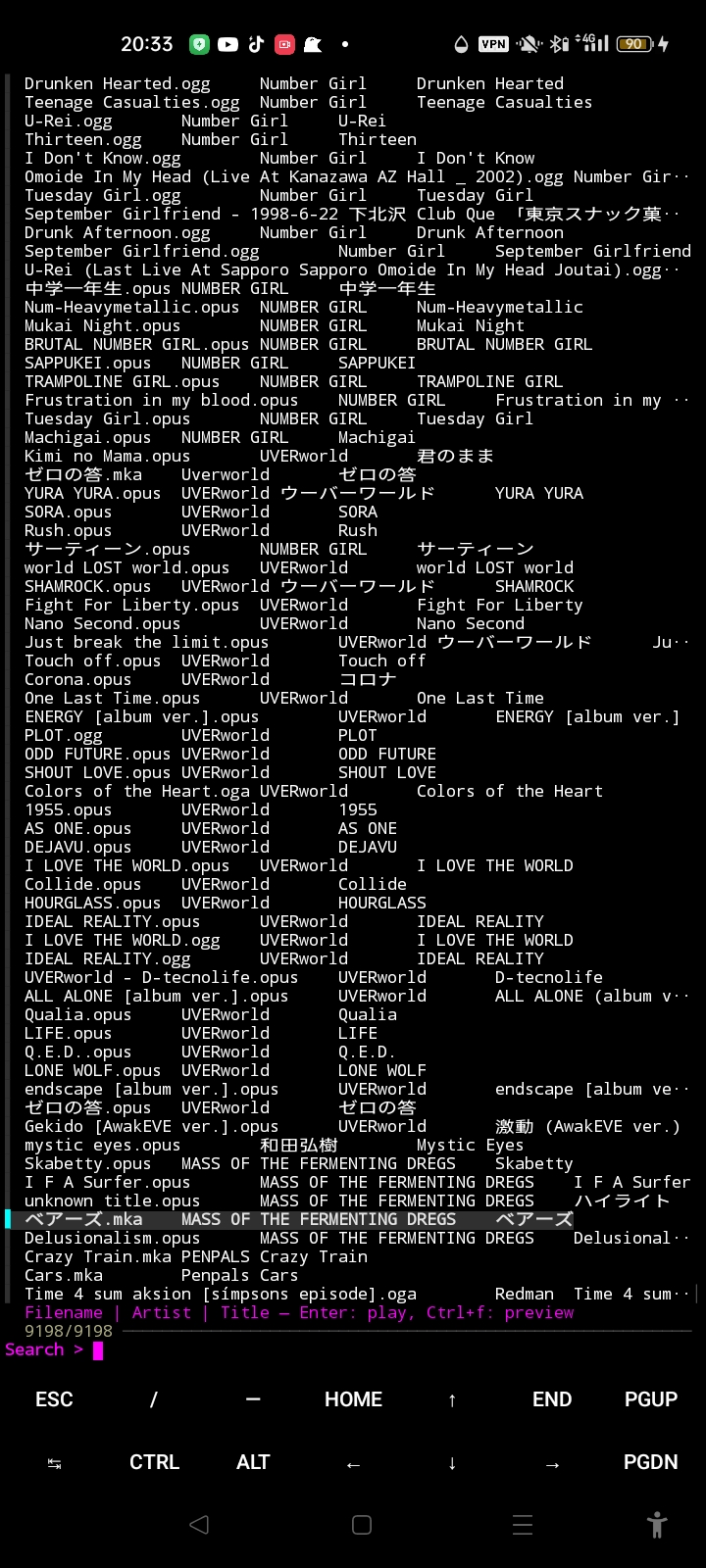
- Interactive fuzzy search (new!) Run sqlplayer search – a full‑screen picker appears (powered by fzf). You see filename | artist | title and can type to filter. Press Enter to play a track immediately, or Ctrl+f to preview extended metadata (artist, album, duration, codec) if you have mediainfo installed.
This is perfect for quickly finding that one song without remembering the exact spelling.
What You Need (Termux packages)
pkg install sqlite mpv socat jq fzfOptional but nice: mediainfo for the preview pane.
How to Use
- Make sure your ~/audio.db exists (created by another tool – the script only reads it).
- Save the script as sqlplayer, make it executable (chmod +x sqlplayer), and run: · ./sqlplayer artist “some name” · ./sqlplayer search
Why It’s Cool
· No GUI – runs entirely in Termux, lightweight. · Notification controls – you can lock your phone and still skip tracks. · Two workflows – batch playback by artist/song, or interactive one‑off picks. · Respects your mpv keybindings – q quits the current playlist, Enter or > skips to next track (in playlist mode).
The script cleans up after itself (temporary sockets, fifos, and background processes) so you never leave garbage behind.
Perfect for Termux users who want a no‑bloat, keyboard‑driven music
experience on Android.